Block Buster MicroVision System Price Guide & Value
Also Available On
Details Block Buster (MicroVision System)
- Console
- MicroVision System
- Genre
- Arcade
- Publisher
- Milton Bradley
- Release
- 1979
Market Value Block Buster
Price History Block Buster
Market Value & Price Range: Block Buster
How much is Block Buster worth on MicroVision System?
The current price guide for this title is around $105.50 for a Complete (CIB) copy. For serious collectors, a brand new / sealed copy is valued at approximately $211.00. Graded copies (WATA/VGA) have been seen reaching $232.10 depending on the grade. This arcade title published by Milton Bradley remains a staple for any MicroVision System library.
Where to buy Block Buster cheaper?
If you are looking where to buy Block Buster cheaper, the best live offer currently starts at $3.74 for a Used copy.
Buying Guide & Authenticity
Is Block Buster a rare game?
Block Buster on MicroVision System is a highly sought-after title. Valued at $105.5 complete-in-box, it's a valuable addition to any collection. This is primarily an NTSC version (US or Japan). Import demand may influence its availability.
Description Block Buster
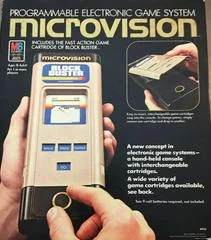
Block Buster is the original launch title for the Microvision game system, rather like Tetris which came packed in with the original Game Boy upon it's release in 1989. As such, Block Buster came packed in the same box with the Microvision system, and was intended to show off the strengths of the system. Since the Microvision came with a built in rotating paddle controller, Block Buster works specifically with this control input. Block Buster is, as its core, simply a clone of the classic Atari 2600 game Breakout. Players use the paddle knob to move a paddle left and right along the bottom of the gameplay screen to bounce a ball against blocks at the top with the goal of clearing as many blocks as possible. There are two speeds selectable with the Speed button, and the Paddle button selects the sizes of the paddle as either "Double" or "Triple." Triple is a paddle three pixels wide. The ball must be served by pressing the Go button. The Go button also navigates through the brief menu system and score screens.